 Tigerfish
Your whole database day, in one place.
Write SQL with IntelliSense that understands your query. Find out why something is slow and fix it. Then compare, deploy and design without leaving the app. Tigerfish is the environment for people whose work is the database.
SQL Server, Azure SQL, PostgreSQL and Fabric. Windows, Linux and macOS.
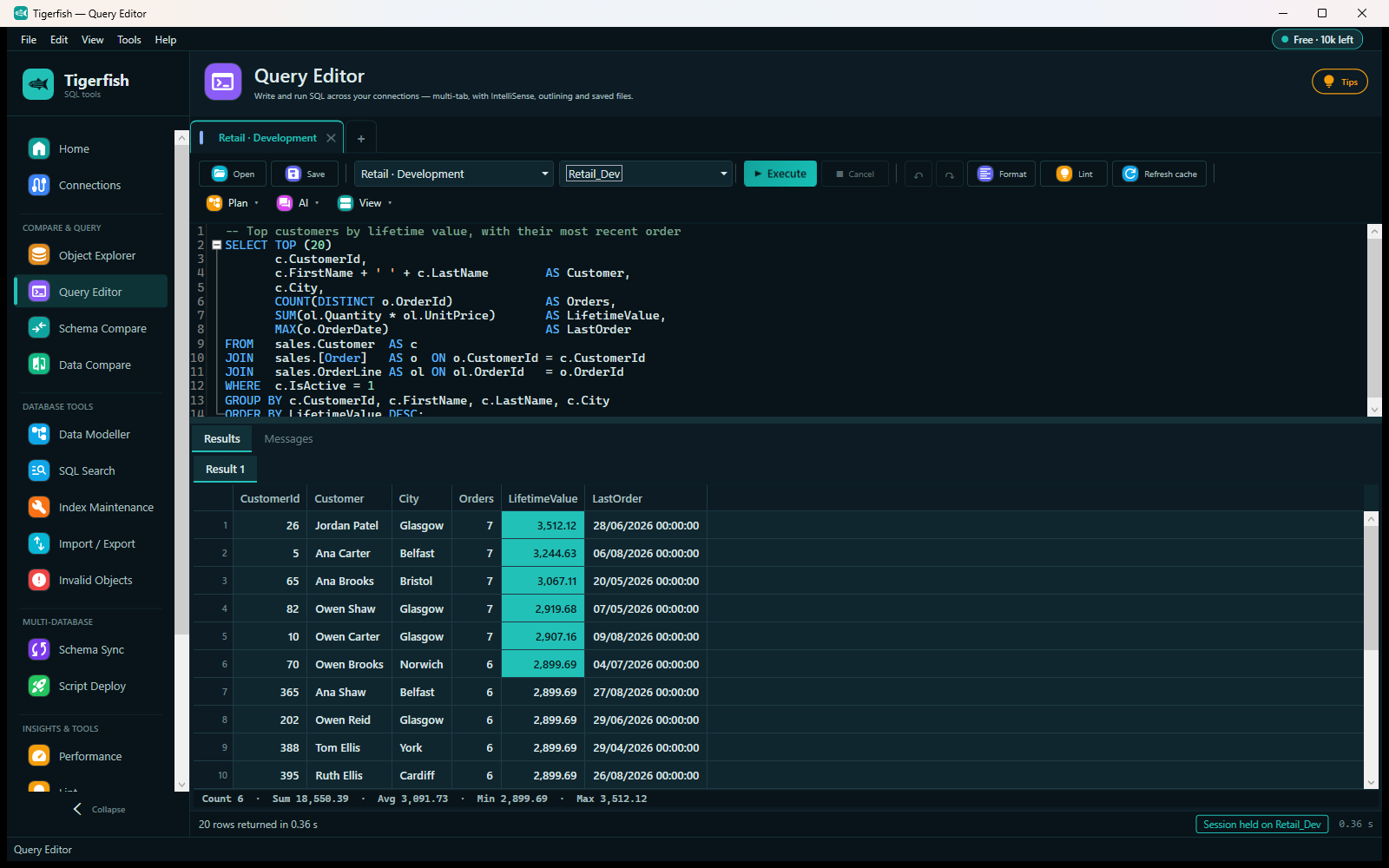
A query editor you'll actually want to live in.
The query editor is where most of the day goes, so it gets most of the engineering. Completion reads the whole statement, not just the word you're typing, and every tab keeps its own session.
IntelliSense that knows your query
Join three aliased tables and type o.: you get that table's columns, and only those. Unqualified columns come back qualified with the right alias. First suggestions in about 60 ms on a 2,400-column schema.
Format, lint, navigate
A formatter built on Microsoft's own T-SQL parser, 135 static-analysis rules (with a separate PostgreSQL set), snippets, surround-with, go-to-definition and multi-caret editing.
Results built for reading
Filter, sort, format and export in the grid. Select cells and the count, sum, average, min and max are already there. Edit rows in place.
Plans you can read
Graphical execution plans for both engines, with per-node cost and actual against estimated rows, and plain-language advice on what the plan is telling you.
Long jobs that stay visible
Run a long statement as a job and watch it live: its plan, its waits, and what is blocking it, refreshed while it runs.
An assistant that checks before it answers
Optional, and off until you turn it on. Ask why a query is slow and it reads plans, sizes and sessions first. It can prove an index helps by building it, measuring, and rolling it all back, and it asks you first.
Find out why it's slow, then fix it.
One click on Diagnose runs read-only checks in parallel, across a database, an elastic pool or a whole server, and ranks everything into one list. Live blocking comes first, then running work, then fixes, then background. Each finding says what it means in plain words and has the button to act on it.
- Inspect a session: its statement, the procedure it belongs to, its waits, its blockers and its live plan, shown as simple tiles.
- Kill safely: the session's identity is checked first, so a reused session id is never ended by mistake.
- Optimise: rule-based advice from the plan and statistics, with AI suggestions on top if you've turned them on. Improve it in a query tab opens the SQL and its plan ready to work on.
- 22 diagnostic checks underneath: wait statistics, top queries by CPU, duration and IO, index usage, stale statistics, sizes, plus wraparound, vacuum and replication lag on PostgreSQL.
Everything hangs together.
One set of connections, one project, one licence, and every workspace can hand work to the next. A Performance finding opens in a query tab with its plan; the fix becomes a script; the script goes through compare and deploy; the change lands in git. You never copy a connection string or paste between tools.
- Object Explorer
- Query Editor
- Performance
- Schema Compare
- Data Compare
- Data Modeller
- SQL Search
- Index Maintenance
- Import / Export
- Schema Sync
- Script Deploy
- Invalid Objects
- tSQLt tests
- History
And when it's time to ship.
Compare and deploy are part of the same environment, not a separate product.
Schema and data compare
Any of a live database, script folder, DACPAC, backup, git branch or data model against any other. Procedures, triggers, constraints and column widths included as standard.
Deploys that don't give up
A column blocked by a schema-bound view? Tigerfish captures what's in the way, drops it deepest-first, makes the change and rebuilds it all, in one transaction.
Your pipeline, unchanged
Output as plain SQL, Liquibase changelogs or Flyway migrations, and the same engine on the command line for CI.
Four engines, understood properly.
Not a hundred connectors at arm's length. Four engines read deeply enough to complete, diagnose and deploy them correctly.
- SQL Server 2016+
- Azure SQL
- PostgreSQL
- Microsoft Fabric compare & deploy
Spend a day in it.
Point it at your own servers, write the queries you'd write anyway, and press Diagnose. That's the only benchmark that means anything.